
Discover how to turn your EYE Reports into actionable insights that make planning easier and more effective!
Your EYE reports are more than just numbers - they’re a roadmap to understanding each child’s learning journey. In this latest newsletter, we’ll show you how to interpret your reports with confidence and turn insights into actionable steps that make planning easier and more effective. Whether you’re looking to identify strengths, address challenges, or streamline your next session, we’ve got you covered.
Next Steps for Supporting Every Child
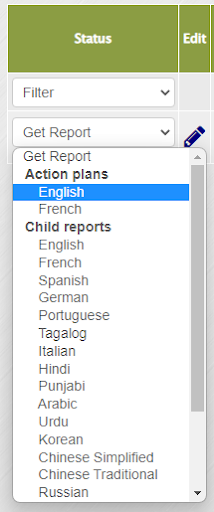
The EYE Child Action Plans provide a practical framework for turning assessment results into meaningful action. These plans help educators collaborate effectively, set clear goals, and track progress for each child. By reviewing data, identifying areas of concern, and implementing targeted strategies, you can ensure every child receives the support they need to thrive.
We offer pre- and post-session versions for both EYE-DA and EYE-TA. These plans come pre-populated with each child’s results and are ready to download from our online data entry site once reports are generated.
Simply click the ‘Get Report’ drop-down menu to access this valuable resource.
And here’s the exciting part: our Action Plans now include a built-in dropdown menu of suggested comments to make your planning process faster and easier!
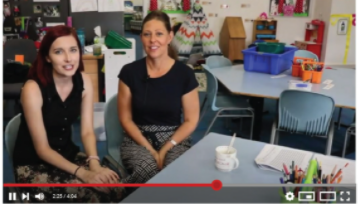
Watch this short video to see just how simple it is to add your comments and customize your plan.
Insights in Every Language
Once you have your EYE Child Reports, the next step is sharing progress in a way that families and educators can understand. EYE reports are now available in 21 languages, making it easier to communicate results and recommendations across diverse communities. This multilingual access ensures that every child’s learning journey is supported with clarity and inclusivity—no matter the language spoken at home.
Check out these additional resources:
- Using the EYE-TA to support early literacy development
- Understanding the differences between the EYE-TA domain and RTI results
Educator Videos & News
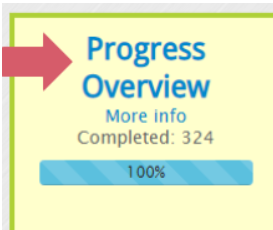
Exciting News! We’ve added a fantastic feature to help you quickly identify which children were not assessed in the previous EYE session.
If you’re an EYE division coordinator or school coordinator, simply click the Progress Overview icon once your session is complete.
At the top of the page, you’ll see an option to download a detailed Excel report. This report lists the names of children who were not assessed, along with any notes or reasons provided by the teacher.
As we wrap up this edition and look ahead to the holiday season, we want to extend our warmest wishes to you and your loved ones.

At The Learning Bar, our vision remains clear: Giving all children the opportunity to thrive. Together, we are turning this vision into reality. Thank you for your continued partnership and for allowing us to be part of your journey.
May your holidays be filled with joy, laughter, and meaningful moments.
The Learning Bar Team
*Please note that our offices are closed for the holidays from Dec 19th to Jan 2nd.
Follow us on:

Share your stories, comments, and feedback with us at any time. We love hearing from you!
Check out past editions of the Early Years Evaluation (EYE) newsletters on the Knowledge Base! | |||